Know what you owe. Skip the April surprise.
TaxClover keeps U.S. freelancers and 1099 workers tax-ready year-round — a live quarterly estimate, Schedule C expense tracking, mileage, and receipt scanning. We don't file your taxes. We make sure you're never caught off guard.
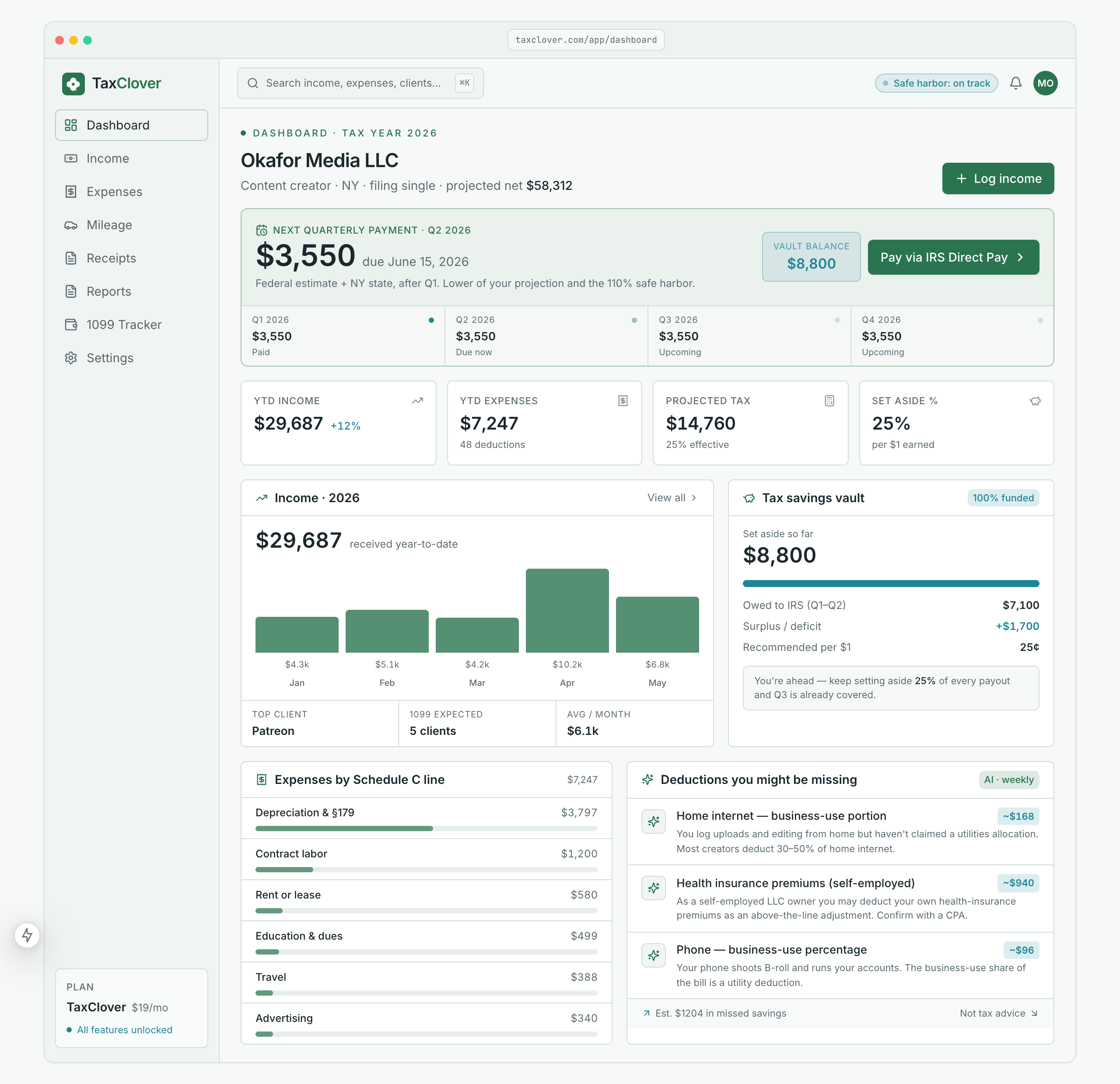
What do you actually owe? Find out in 10 seconds.
Drag the slider. This is the same engine that runs live inside TaxClover — federal income tax, self-employment tax, and your state, all at once.
Open it once a week. Know exactly where you stand.
Tell us about your work
A 90-second onboarding: your line of work, your state, filing status, and a rough income expectation. You get a working calculator before you've logged a thing.
Log income & expenses as you go
Add a payout in 10 seconds, import a CSV from Stripe or PayPal, or snap a receipt and let OCR categorize it. Every entry feeds the estimate.
See what you owe — always
Your dashboard shows the next quarterly amount, the date it's due, and the exact percentage to set aside from each payment. No surprises.
Hand off a clean bundle at year-end
Download a Schedule C preview, a P&L, categorized CSVs, and every receipt — zipped. Give it to a CPA or drop it into TurboTax. We don't file; we make filing easy.
The whole job — except filing.
Filing is one stressful week in April. Staying tax-ready is the other 51. TaxClover owns the 51 — then hands a clean bundle to whoever files.
Live quarterly tax calculator
Federal income tax, self-employment tax, and your state — recalculated every time you log a dollar. Safe-harbor logic built in, including the 110% rule for higher earners.
Schedule C expense tracking
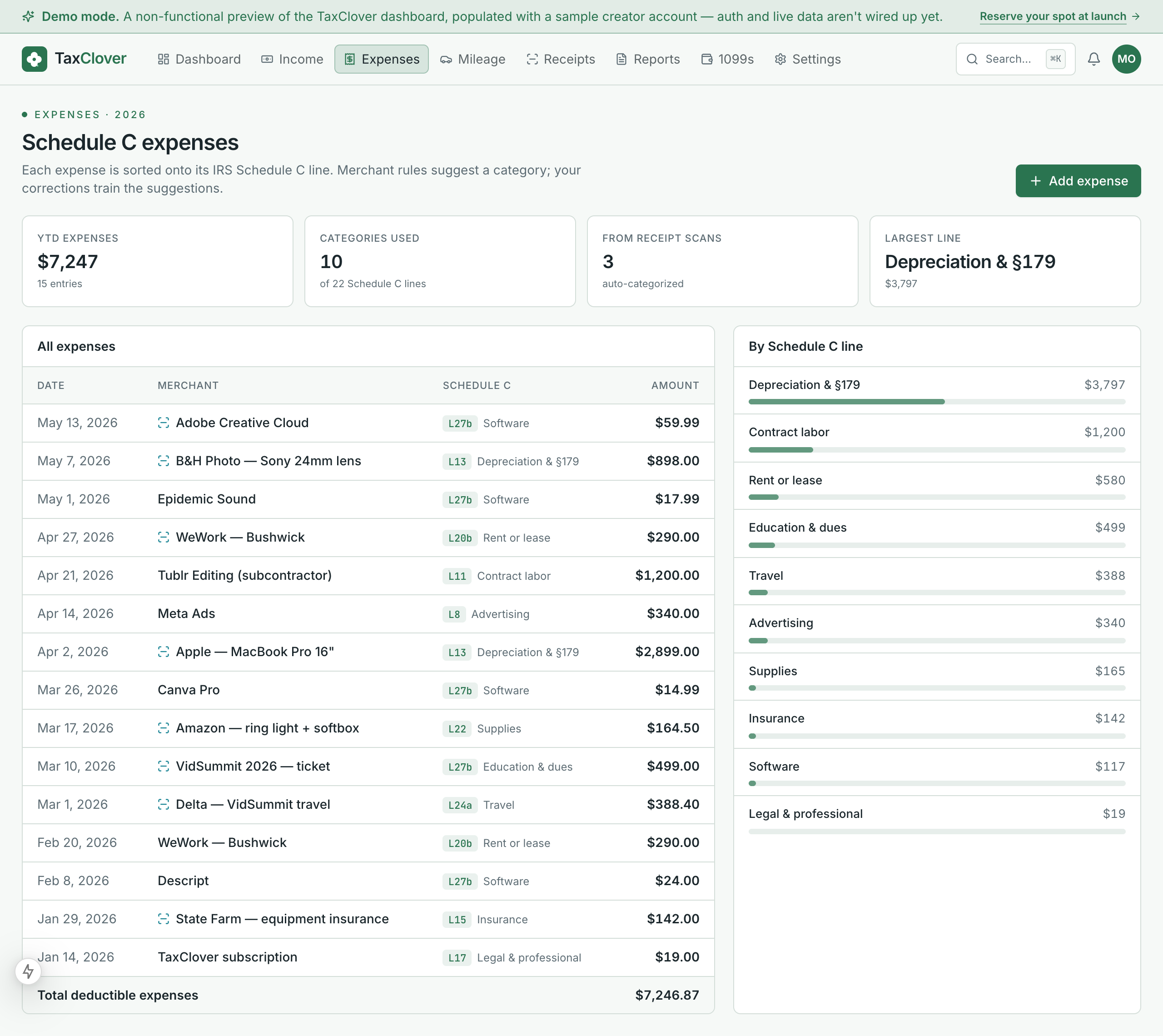
Every expense lands on the right IRS line (8 through 27b). Merchant rules auto-suggest categories — Adobe to software, Delta to travel — and learn your corrections.
Mileage at the 2026 rate
Log trips by date, miles, and purpose. TaxClover values each trip at the rate in effect that day — 72.5¢ before July 1, 2026, 76¢ after — and keeps prior years at their own historical rates.
Receipt scanning
Snap or drop a receipt. OCR pulls the vendor, date, and total, drafts a categorized expense, and drops it in your review inbox.
Tax savings vault
After every payment you receive, TaxClover tells you the exact dollar amount to move to savings — and tracks your running balance against what you owe.
1099-NEC tracker
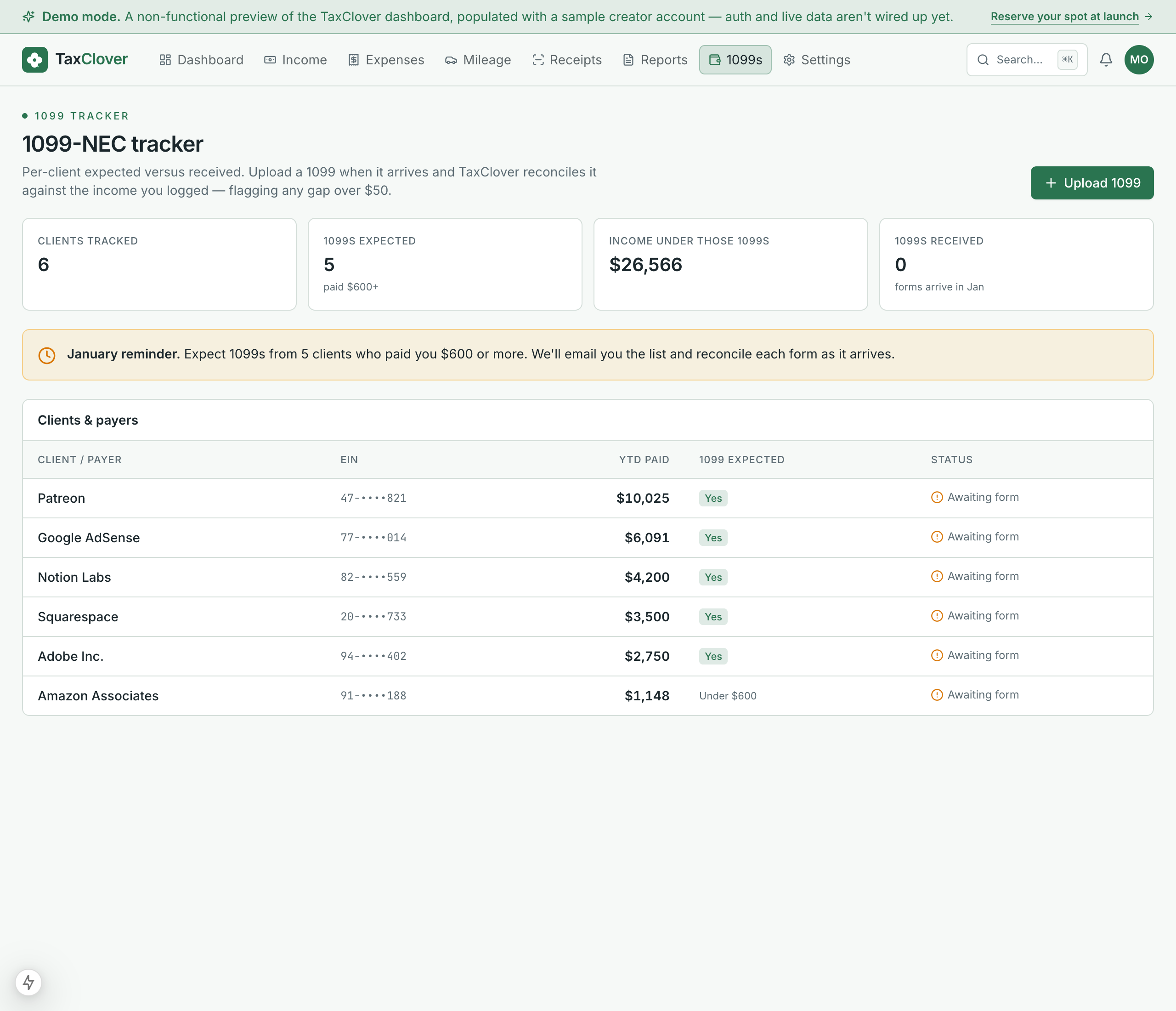
See expected versus received 1099s per client. Upload the PDFs you get and TaxClover flags any mismatch over $50 before it becomes an IRS letter.
AI deduction finder
A weekly, profession-aware digest of write-offs you may be missing — ranked by estimated savings. Plus a tax-aware chat with a hard 'not advice' guardrail.
Year-end CPA bundle
A Schedule C preview PDF with every line populated, a P&L, expense CSVs by category, and all your receipts — zipped and ready to hand to a CPA or drop into TurboTax.
Quarterly reminders
Email and in-app nudges at T-14, T-7, and T-1 before each deadline — plus a gentle prod when you haven't logged anything in two weeks.
Not a spreadsheet. Not a shoebox.
A web-first interface built to be read at a glance — the part mobile-only competitors never got right.
Every expense, on the right Schedule C line
Adobe to software, the WeWork desk to rent, the camera body to §179. The right-hand panel totals each line so you see your deductions take shape.
1099s reconciled before they become a problem
TaxClover knows which clients paid you $600+ and expects a form from each. When the 1099 arrives, it checks the number against what you logged.
Schedule C, written in your language.
The tax engine is the same underneath — but the deductions, the examples, and the calculator pre-fill are tuned to what you actually do. Pick your work:
Direct, factual, no smear.
Pricing pulled from competitor pages, May 2026. QuickBooks Self-Employed was discontinued in 2024 — its successor is shown.
| Feature | TaxClover | Keeper | Hurdlr | QB Solopreneur |
|---|---|---|---|---|
| Price | Free while in beta | $192–$399/yr | $100–$200/yr | ~$20/mo |
| No annual lock-in | ||||
| Quarterly tax calculator | ||||
| Schedule C expense tracking | All 22 lines | |||
| Bank linking required | No — never | Yes (Plaid) | Yes (Plaid) | Yes |
| Web-first interface | ||||
| Try it without a card | ||||
| Files your taxes | No (by design) | Via TurboTax | ||
| Year-end CPA bundle |
“No” on filing is deliberate — filing is a different business with a CPA army behind it. We make your year-end bundle so good that filing is the easy part.
No more surprise tax bills.
“I used to find out what I owed in April. Now I open TaxClover on Sundays and the number's just there. June 15 was a non-event — the money was already set aside.”
“Three apps, three 1099s, and I never knew my real number. TaxClover logs the miles and tells me 'pay $940 by Sep 15.' That's the whole job.”
“A $0 month then a $31k closing. The estimate updated the day the commission cleared and told me exactly what to move. No April cliff.”
Composite quotes from beta testing, illustrative of common use cases.
Answers, with all the caveats.
Does TaxClover file my taxes?+
No — and that's deliberate. Filing is a separate business with a CPA army behind it. TaxClover keeps you tax-ready all year, then produces a year-end bundle (Schedule C preview, P&L, categorized expense CSVs, receipts) you hand to a CPA or drop into TurboTax. We're not a CPA or tax preparer.
How accurate is the quarterly calculator?+
The engine estimates 2026 federal income tax, self-employment tax, Additional Medicare Tax, and QBI when the supplied facts are enough to determine it. State tax is shown separately as a rough planning reserve. The safe-harbor estimate uses the general 90% current-year and 100%/110% prior-year rules. It is a planning estimate, not a filed return.
Why don't you connect to my bank like Keeper or Hurdlr?+
Bank-linking carries a per-account monthly fee, and it's the #1 source of reliability complaints in competitor reviews. We skip it. Manual entry, CSV import, and receipt scanning capture the same data without the cost or the broken connections — and without handing a third party read access to your bank.
It's free? What's the catch, and what happens after the beta?+
No catch and no card. TaxClover is still being built, so while it's in beta every feature is free — including exports and the year-end bundle. We may charge once it's out of beta, and if we do you'll get 30 days' notice by email first, with the option to export everything you've entered and walk away. We won't take a card we then quietly charge, because we never took one.
Do I even need to pay quarterly taxes?+
If you expect to owe $1,000 or more in federal tax for the year and it isn't being withheld, the IRS generally expects four estimated payments. Onboarding asks a few questions and tells you straight away whether quarterly payments apply to you — Sasha-style W-2-plus-freelance situations included.
Can it handle a W-2 spouse or W-2 income of my own?+
Yes. The calculator folds in W-2 wages and withholding so your quarterly number reflects the real joint position — not just your freelance profit. That's also what triggers the right safe-harbor multiplier.
What does the AI actually do?+
It produces a weekly, profession-aware digest of deductions you might be missing, ranked by estimated savings, and powers an in-app chat. It has a hard guardrail: it never gives tax advice and always points advice-style questions to a CPA.
Can I leave and take my data with me?+
Yes. There's no subscription to cancel during the beta, and you can export your income, expenses, mileage and receipts as CSV at any time — plus delete your account in one click, no email chain. The exit is as plain as the signup.
The April surprise is a choice. Stop choosing it.
It's free while we're in beta — no credit card. Log a week of income and see your real number. We'll give 30 days' notice before we ever charge.